PayPal Export Cleaner
A Python workflow in Jupyter Notebook
All examples shown use mock data. No real PayPal data is displayed.
context
At a few businesses I have worked at, we have paid hundreds of freelancers via PayPal, with many above the threshold that requires collecting W8/W9 forms and issuing 1099s. PayPal exports are clunky, and using multiple PayPal accounts for payouts makes it even harder to track who needs which tax form. Instead of manually stitching spreadsheets together and emailing people one by one, I wrote a Python script to clean the PayPal data and streamline W8/W9 hunting.
what this tool does
- Load CSV exports from multiple PayPal accounts. Combine raw PayPal exports into a single dataset and tag each row with its source account, since freelancer payouts were processed across multiple PayPal accounts.
- Ensure the data is properly formatted for downstream processing. Normalize column names, data types, and monetary fields so there are no issues when applying filtering, grouping, aggregation, or export logic in later steps.
- Filter transactions by the presence of a payee name. Raw PayPal exports include many rows that are not freelancer payouts (bank transfers, balance movements, currency conversions, fees, refunds, disputes, and system entries). These rows typically do not include a payee name. By keeping only transactions with a name, the dataset implicitly filters down to actual freelancer payouts.
- De-duplicate transactions (safety check). As a precaution, remove any duplicate payouts using transaction identifiers and source account context, even though duplicates are not expected under normal circumstances.
- Capture the email associated with each freelancer’s PayPal account. Extract the email tied to each freelancer’s PayPal account and use it as a stable identifier for outreach and tax-form tracking.
- Aggregate payouts by freelancer and currency. Combine individual PayPal transactions into cumulative payout totals per freelancer (and per currency), producing a concise, finance-ready summary instead of a transaction-level ledger.
- Normalize payouts into USD using a rough FX table. Convert foreign-currency payout totals into approximate USD values so freelancers can be compared, ranked, and reviewed using a rough USD-based ordering.
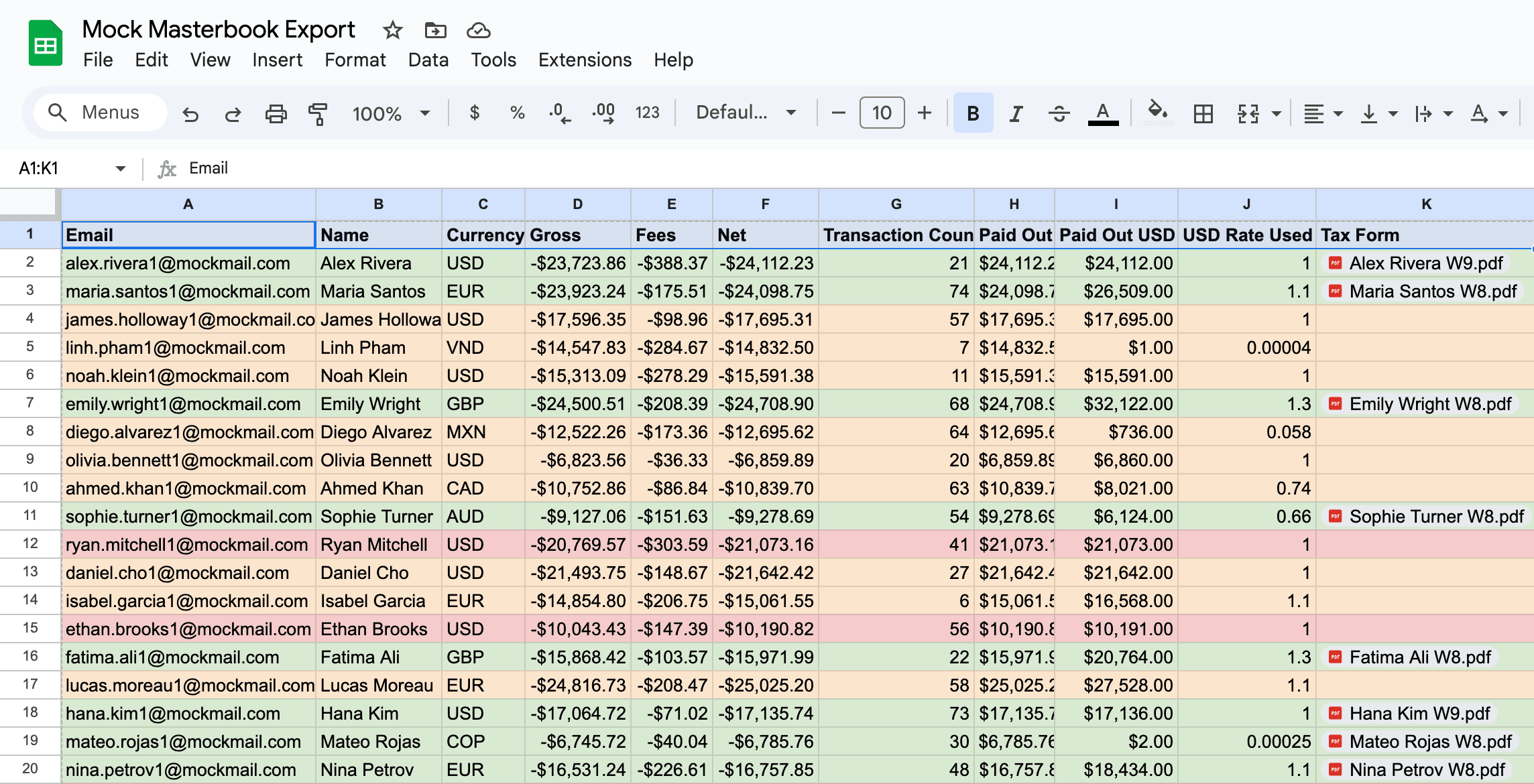
- Add a tax-form tracking column for post-processing. Add a blank “Tax Form” field so compliance status can be tracked after export (W8/W9 collected, missing, or outreached).
- Export a three-sheet Excel workbook. Output (1) the cleaned freelancer-level summary, (2) the filtered “transactions with names” audit layer, and (3) the original raw PayPal download for traceability and reconciliation.
- Track tax-form collection in Google Sheets + Drive. Import the exported workbook into Google Sheets, link each freelancer’s row to their W8/W9 PDF stored in Google Drive, and update status (collected / missing / outreached) as tax-form hunting progresses.
under the hood
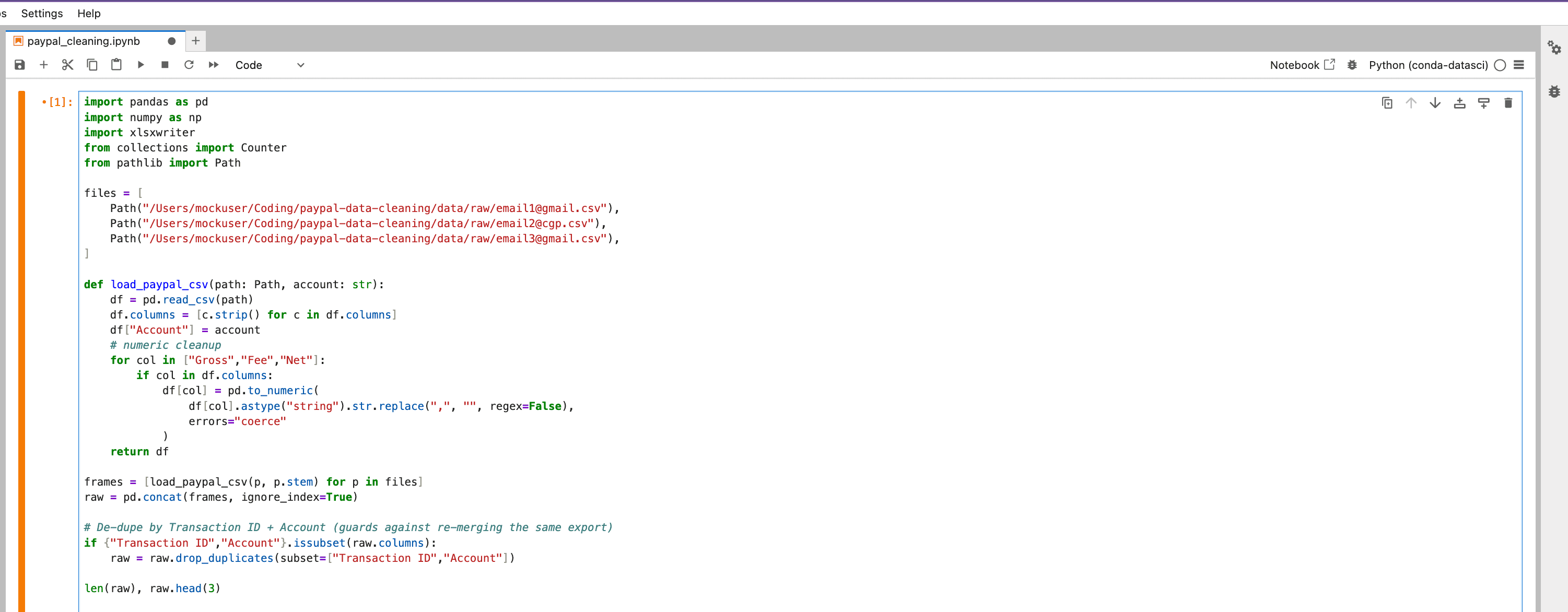
The notebook runs a lightweight ETL pipeline: normalize → clean → aggregate → export. Below is a simplified version of the core logic.
# 1. Load CSV exports from multiple PayPal accounts
from pathlib import Path
import pandas as pd
import numpy as np

files = [
    Path("/Users/mockuser/Coding/paypal-data-cleaning/data/raw/mock1@gmail.csv"),
    Path("/Users/mockuser/Coding/paypal-data-cleaning/data/raw/mock2@gmail.csv"),
    Path("/Users/mockuser/Coding/paypal-data-cleaning/data/raw/mock3@gmail.csv"),
]

frames = [pd.read_csv(p).assign(Account=p.stem) for p in files]
raw = pd.concat(frames, ignore_index=True)
# 2. Normalize column names, data types, and money fields
raw.columns = [c.strip() for c in raw.columns]
required = ["Date","Time","TimeZone","Name","Type","Status","Currency","Gross","Fee","Net","Transaction ID","Balance Impact","From Email Address","To Email Address"]
for col in required:
if col not in raw.columns:
raw[col] = np.nan
for col in ["Gross","Fee","Net"]:
raw[col] = pd.to_numeric(raw[col].astype("string").str.replace(",", "", regex=False), errors="coerce")# 3. Filter to transactions with a payee Name (actual freelancer payouts) with_names = raw[raw["Name"].notna()].copy()
# 4. De-duplicate payouts using Transaction ID + Account
if {"Transaction ID","Account"}.issubset(with_names.columns):
    with_names = with_names.drop_duplicates(subset=["Transaction ID","Account"])
# 5. Capture a stable email per freelancer (sender/receiver flips on debit/credit)
is_debit = with_names["Balance Impact"].astype(str).str.lower().eq("debit")
row_email = with_names["To Email Address"].where(is_debit, with_names["From Email Address"])
fallback = with_names["From Email Address"].where(is_debit, with_names["To Email Address"])
with_names["Freelancer Email (candidate)"] = row_email.fillna(fallback)# 6. Collapse to one canonical email per freelancer
from collections import Counter
def most_common_email(series: pd.Series):
vals = [x for x in series.dropna().astype(str) if x.strip()]
return Counter(vals).most_common(1)[0][0] if vals else None
email_per_name = (
with_names
.groupby("Name")["Freelancer Email (candidate)"]
.apply(most_common_email)
.reset_index()
.rename(columns={"Freelancer Email (candidate)": "Email"})
)# 7. Aggregate payouts by Name × Currency
summary = (
with_names
.groupby(["Name","Currency"], as_index=False)
.agg({
"Gross": "sum",
"Fee": "sum",
"Net": "sum",
"Transaction ID": "count",
})
.rename(columns={"Transaction ID": "Transaction Count"})
)
summary = summary.merge(email_per_name, on="Name", how="left")# 8. Convert to rough USD, add Tax Form column
summary["Paid Out"] = (-summary["Net"]).clip(lower=0)
FX_RATES = {"USD": 1.00, "PHP": 0.0178, "BRL": 0.19, "EUR": 1.10, "GBP": 1.30, "CAD": 0.73, "AUD": 0.66, "MXN": 0.055, "JPY": 0.0068}
summary["USD Rate Used (Rough Estimate)"] = summary["Currency"].map(FX_RATES)
summary["Paid Out USD"] = summary["Paid Out"] * summary["USD Rate Used (Rough Estimate)"]
summary["Tax Form:"] = ""# 9. Export cleaned summary + audit layers to Excel
cols_order = [
"Email","Name","Currency","Gross","Fee","Net","Transaction Count",
"Paid Out","Paid Out USD","USD Rate Used (Rough Estimate)","Tax Form:",
]
summary = summary.reindex(columns=cols_order).sort_values("Paid Out USD", ascending=False).reset_index(drop=True)
with pd.ExcelWriter("Creator Payout Accounting (Example).xlsx", engine="xlsxwriter") as xw:
summary.to_excel(xw, sheet_name="PayPal Data Cleaned + Summarize", index=False)
with_names.to_excel(xw, sheet_name="Transactions with Names Only", index=False)
raw.to_excel(xw, sheet_name="PayPal Download", index=False)# 10. Track tax-form collection in Sheets/Drive (post-export) # Import the workbook to Sheets, link each freelancer row to their W8/W9 PDF in Drive, # and mark status as collected / missing / outreached.
output workbook
The script exports a clean Excel file with three tabs:
- • PayPal Data Cleaned + Summarize — per-freelancer totals & USD estimates.
- • Transactions with Names Only — row-level detail for investigation.
- • PayPal Download — normalized raw export for auditability.